
Download iScreenKit – Free Screen Capture & Recording Tool for Windows, Mac, Android, iOS
iScreenKit is a powerful, one-click screen capture and recording software designed for users who want to create high-quality screenshots and videos with minimal effort. Whether you're a teacher, content creator, or remote worker, iScreenKit simplifies the process of capturing your screen with intuitive tools and advanced features. With support for full-screen, window, and region captures, plus a unique scrolling capture function, this tool stands out from basic built-in utilities. The software also allows audio recording via microphone, video editing, GIF creation, and lightweight output files to preserve system performance. Available with a free trial and no credit card required, iScreenKit is secure, easy to install, and compatible across Windows, Mac, Android, and iOS devices.
Intuitive Design & One-Click Capture Experience
From the moment you launch iScreenKit, you’re greeted with a sleek, modern interface that balances functionality with visual elegance. The minimalist design ensures that users aren’t overwhelmed by cluttered menus or complex workflows. Instead, a compact, hidden mini-toolbar appears at the bottom of your screen—unobtrusive yet instantly accessible. This smart design allows you to maintain focus on your work while still having quick access to capture tools whenever needed.
The hallmark of iScreenKit is its one-click capture system. With a single keystroke or click, you can capture your entire screen, a specific window, or a custom region. This simplicity is perfect for users who aren’t tech-savvy but still need professional-grade results.
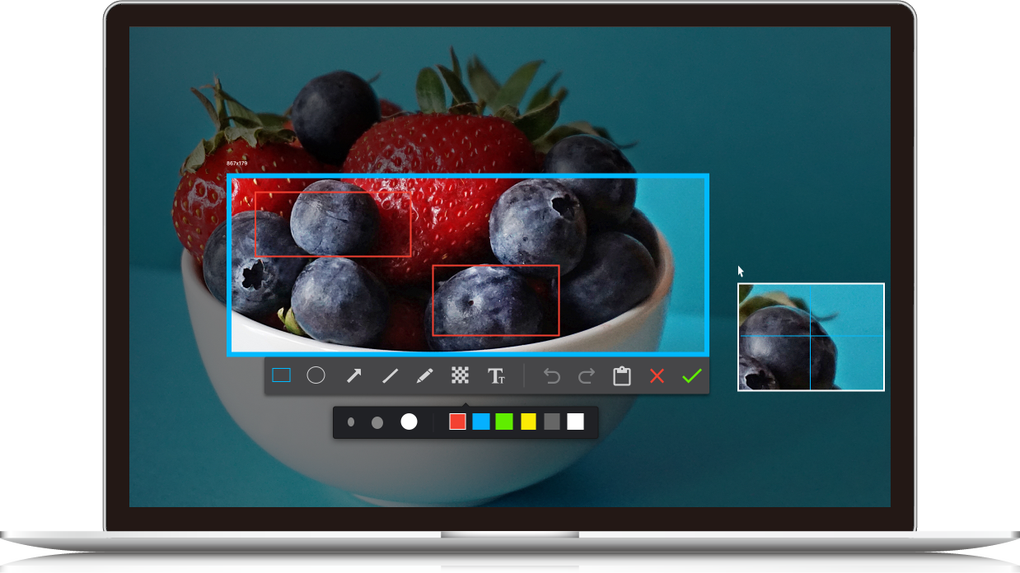
Once captured, a preview window pops up, giving you immediate control over editing. You can add arrows, text annotations, highlight important areas, blur sensitive content, or apply mosaic effects—all directly within the built-in editor. These tools are essential for creating clear, informative visuals for tutorials, presentations, or documentation.
Moreover, the software’s interface is fully customizable. You can adjust the toolbar position, toggle between light and dark themes, and even set hotkeys for your most-used capture modes. This level of personalization ensures that iScreenKit adapts to your workflow rather than forcing you to adapt to it. Whether you're working on a high-resolution monitor or a compact laptop, the responsive UI ensures consistent performance and usability.
Advanced Features for Content Creators & Educators
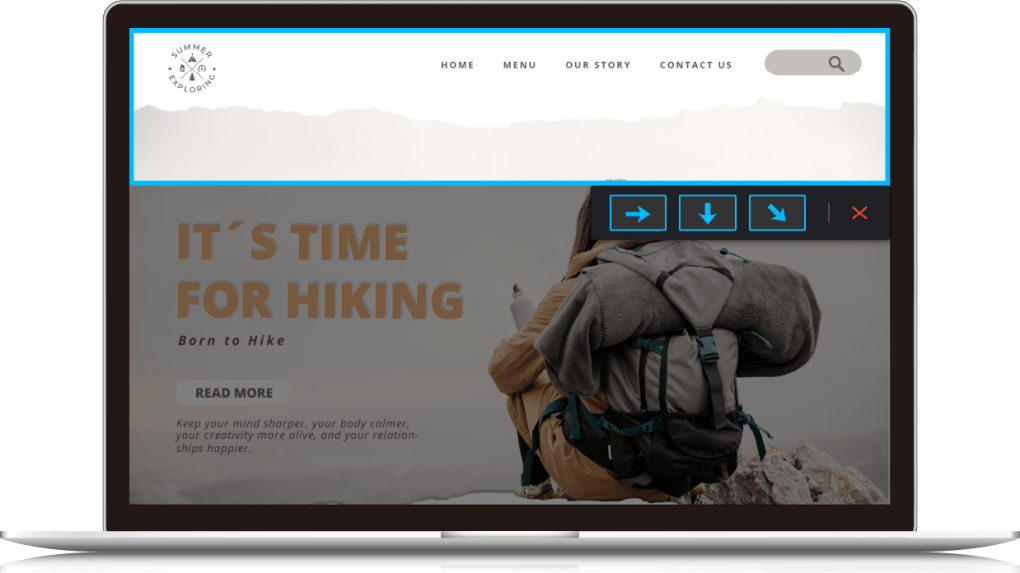
iScreenKit goes far beyond basic screenshot tools by offering a suite of advanced features tailored for educators, digital marketers, and content creators. One of its standout capabilities is the Scrolling Capture function, which allows you to capture long web pages, lengthy Excel sheets, or full PDF documents in a single, seamless image. This eliminates the need for multiple screenshots and manual stitching, saving significant time and effort—especially useful when creating step-by-step guides or documenting lengthy reports.
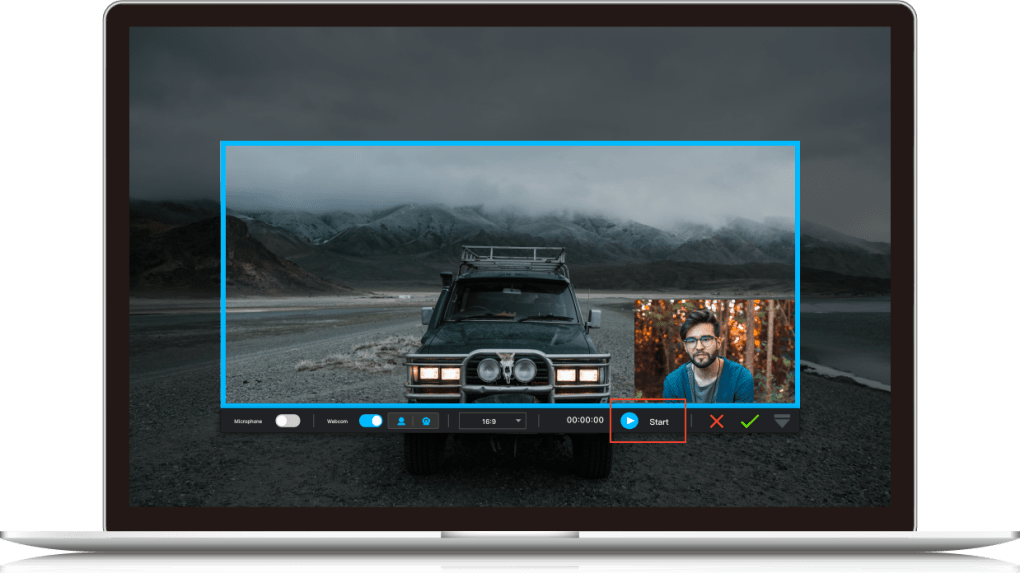
For video recording, iScreenKit supports real-time screen capture with optional audio input from your microphone. This makes it ideal for recording tutorial videos, online lectures, or software demonstrations. You can also record your webcam simultaneously, which is perfect for face-to-camera explanations. After recording, the built-in editor lets you trim unwanted sections, adjust playback speed, and even convert your video into a compact animated GIF—great for social media posts or quick visual references.
Another powerful feature is the lightweight output format. iScreenKit compresses your screenshots and videos without sacrificing quality, helping you save disk space and reduce file transfer times. This is particularly beneficial for users with limited storage or those who frequently share content via email or cloud platforms. Additionally, the software supports multiple export formats, including PNG, JPG, MP4, and GIF, giving you maximum flexibility in how you use your captured content.
Seamless Installation & Cross-Platform Compatibility
Installing iScreenKit is a breeze, regardless of your operating system. Whether you’re using Windows 10/11, macOS, Android, or iOS, the software offers a straightforward setup process. Simply download the installer from the official website, run the file, and follow the on-screen prompts. The entire process takes less than two minutes and doesn’t require admin rights on most systems.
Once installed, iScreenKit runs efficiently in the background, consuming minimal CPU and RAM. It integrates smoothly with your desktop environment, launching instantly when you press the designated hotkey. The software also features automatic update checks, ensuring you always have access to the latest improvements and security patches. These updates are delivered silently in the background, so your workflow remains uninterrupted.
For mobile users, the Android and iOS versions offer a touch-optimized interface with gesture controls, making it easy to capture and annotate content on the go. The cloud sync feature allows you to access your captures across devices, so you can start a tutorial on your laptop and finish editing on your tablet. This cross-platform consistency ensures a unified experience, whether you're working from home, in the office, or on the move.
Key Features of iScreenKit
- One-click screen capture (full screen, window, region)
- Scrolling capture for long web pages and documents
- Real-time screen and audio recording with microphone support
- Integrated editor with annotation tools (arrows, text, blur, mosaic)
- Video trimming and conversion to animated GIF
- Lightweight file output to save storage space
- Hotkey customization and hidden mini-toolbar
- Support for Windows, Mac, Android, and iOS
- Automatic updates and secure, no-credit-card trial
Pros & Cons
Pros
- Simple, intuitive interface with one-click capture
- Powerful scrolling capture for long documents
- Excellent annotation and editing tools
- Supports audio and webcam recording
- Lightweight and efficient on system resources
- Available for Windows, Mac, Android, and iOS
- Free trial with no credit card required
Cons
- Limited advanced editing features compared to full video editors
- Mobile versions have fewer features than desktop versions
- Advanced features locked behind paid upgrade
Frequently Asked Questions (FAQ)
Is iScreenKit free to download and use?
Yes, iScreenKit offers a free trial version that allows you to use all core features without requiring a credit card. You can capture screenshots, record videos, edit content, and export files at no cost. However, some advanced features like cloud storage and batch processing are available only in the premium version.
Can I use iScreenKit on both Windows and Mac?
Absolutely. iScreenKit is fully compatible with both Windows 10/11 and macOS. The desktop versions provide identical functionality, ensuring a consistent experience across platforms.
Does iScreenKit support recording audio during screen capture?
Yes, iScreenKit allows you to record your microphone audio while capturing your screen. This is ideal for creating tutorial videos, online lectures, or voice-over presentations.
How do I convert a recorded video into a GIF?
After recording, open the video in the built-in editor. Select the portion you want to include, then click the "Convert to GIF" option. You can adjust the frame rate and size to optimize file size and quality.
Is iScreenKit secure and safe to install?
Yes, iScreenKit is a secure software that does not contain malware or adware. It’s downloaded directly from the official website, and all updates are verified. Your captured content remains private and is not shared with third parties.
Final Verdict: Why iScreenKit Stands Out
After thorough testing, iScreenKit proves to be one of the most reliable and user-friendly screen capture tools available today. Its combination of one-click capture, powerful editing, and scrolling capture makes it a top choice for educators, remote workers, and content creators. The software is lightweight, secure, and compatible across multiple platforms—offering a seamless experience whether you're on a desktop or mobile device.
If you're looking for a free, no-credit-card-required tool that delivers professional results, iScreenKit is worth downloading. Whether you're creating training materials, documenting software bugs, or sharing quick tips, this tool streamlines your workflow and boosts productivity.
Download iScreenKit today and take control of your screen capture experience—fast, easy, and secure.







